Shein Free Trial Center Tips to Get Selected More Often
Your full guide to the Shein Free Trial Center: apply, track your results, send reviews within 10 days and use the Rewrite option when needed.
Advertisement
Free Trial Center Tips: Simple Ways to Get Selected More Often
There aren't many spots. If you skip the right steps, the system may drop your profile. Use the proven steps below.
Advertisement
An Independent Info Guide This guide draws on public information about the Shein Free Trial Center. We aren't partners with the brand and have no official link to it. Competition for spots is tough, and final approval isn't guaranteed. Read each selection's own terms before you apply.
Why Most Requests Get Turned Down
The distribution dashboard gets tons of applications each week. Lots of people are left out. Their profile isn't complete, they apply too late, their address doesn't match the store's country, or they post thin reviews with no photos once the item arrives.
Want a stronger profile in the system? Build a steady habit. Fill in all your personal details, apply as soon as each period opens and write detailed reviews every single time. The selection process follows strict rules.
What the Sample Program Is About
This area is Shein's official hub for quality checks. Chosen members get products for free. In return, they agree to write an honest review based on how the item worked for them. Once a request is approved, a free order is created and sent on its own.
Spots are few and change all the time. Nobody gets in for sure. Your activity history, how fast you apply and how good your past reviews were decide whether you qualify for future campaigns.
Product Types You'll Often See
The items on offer span many kinds of consumer goods. Stock is refreshed all the time, so the catalog tends to mix new fashion trends with everyday essentials waiting for reviews.
On top of clothing, you'll often find beauty and self-care products, home accessories and modern decor on the dashboard.
Top Categories on the Dashboard:
Go to the trial section
Sign in on the website or in the app and open the trial section. On your phone, the usual route is Profile → More Services → Other Services → Free Trial Center. Then browse what's on offer this cycle.
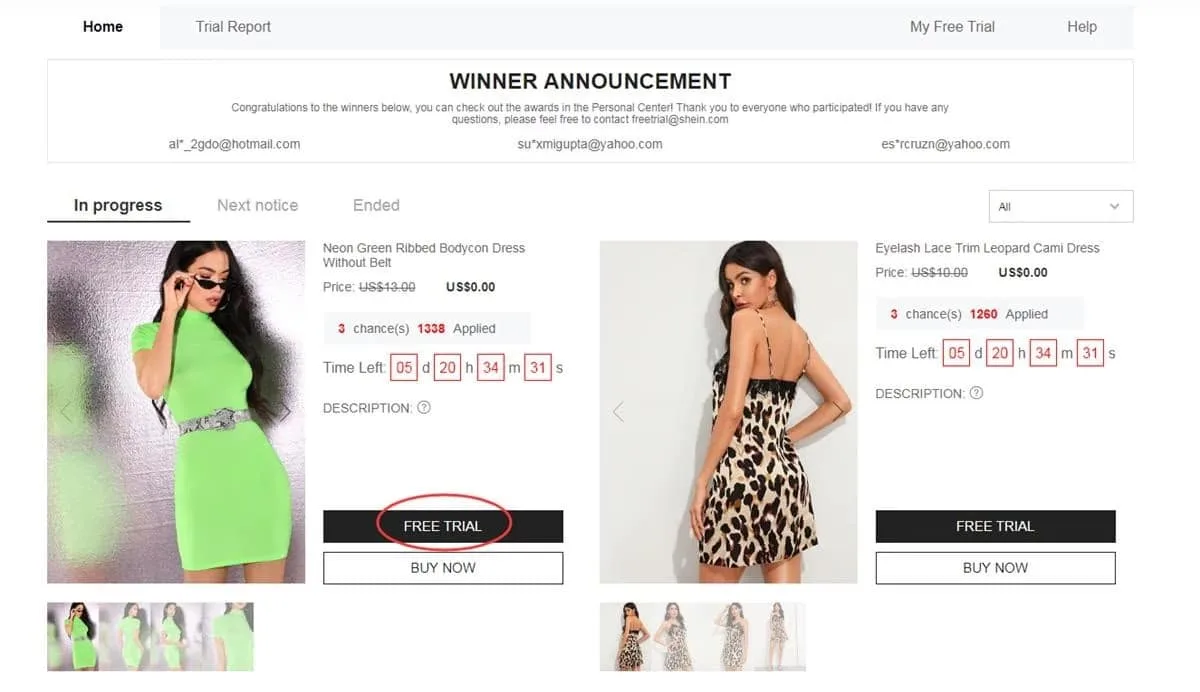
The official route through your account's services menu
Pick up to 3 items each week
You can make only 3 picks per week. Spots you don't use are gone and don't stack up. Tap the trial option, pick the right size, confirm an address in the active store's country and send the form. An invalid address means your request gets rejected.
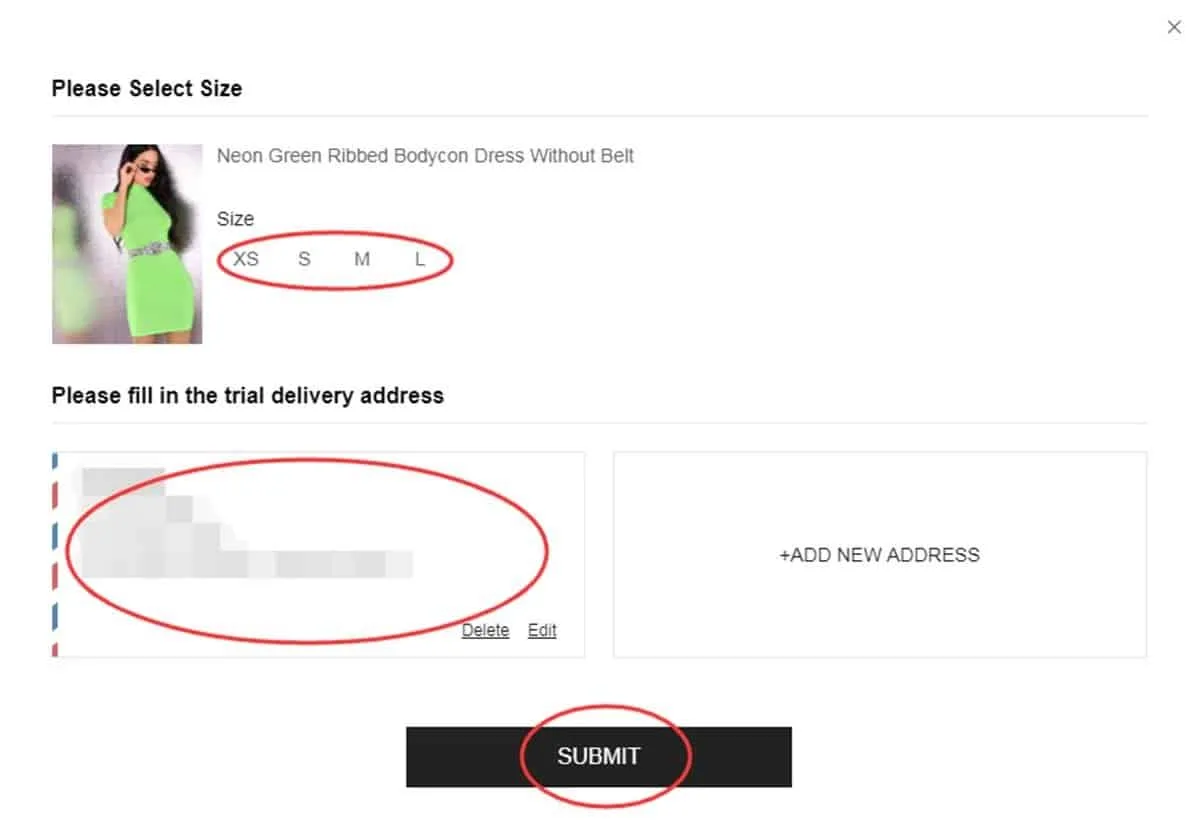
Double-checking sizes and where it will ship
See what the system decides
You'll usually get the final answer in about a week. Open “My Free Trial / My Applications” to see your status. “Approved” means you were picked and your free package is coming. “Failed” means your request didn't make it this time.
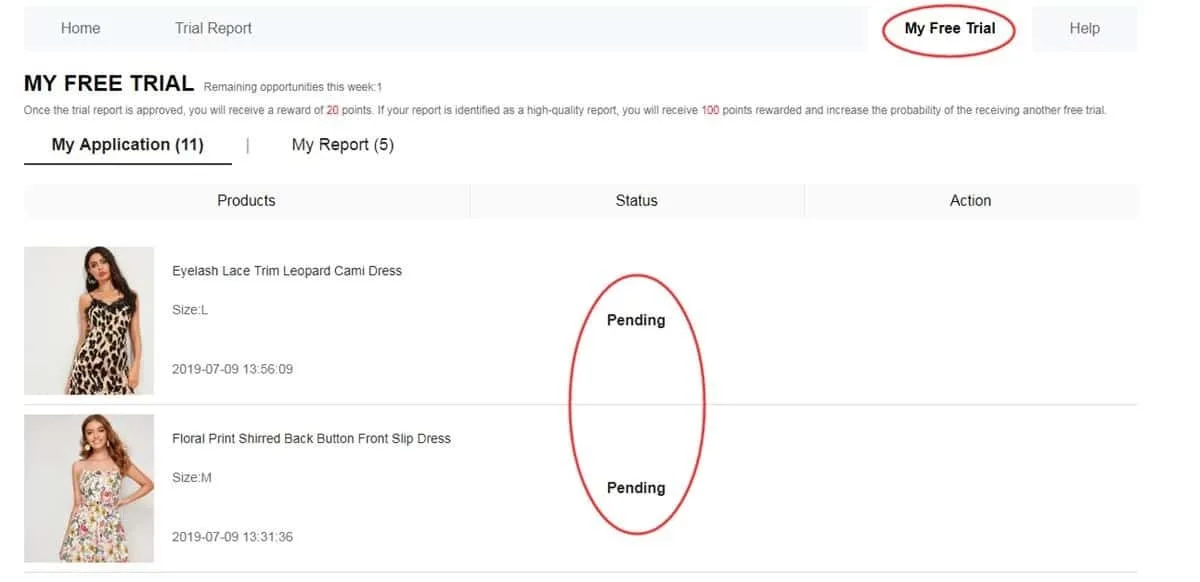
Internal panel showing approvals and rejections
Send your review within 10 days
When the package arrives, try the product and judge its quality, design, fit, fabric and durability. Write a full review with clear photos. One full-body shot and two close-ups work well. Send it with the matching button and track it in “My Report”. Aim to finish before day 10.
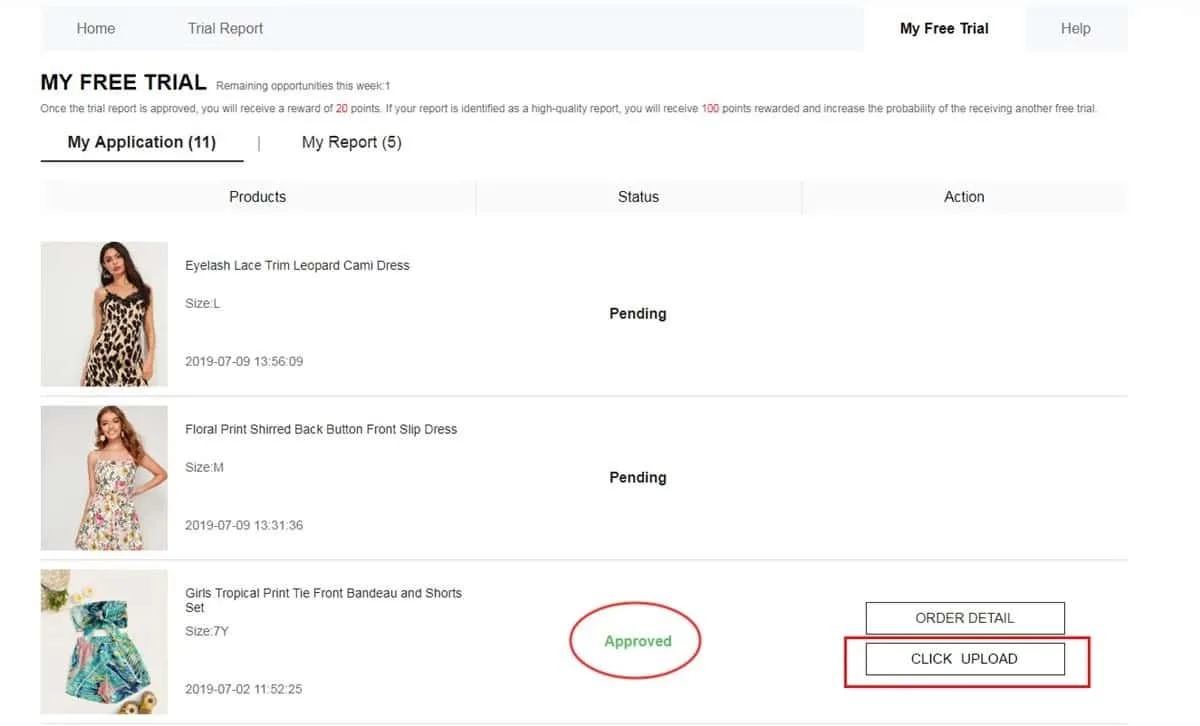
The official place to send written reviews and photos
Check My Report and your points
Once your review is sent, open My Report to see if it went through. An approved review usually earns you 20 points. If the system marks it as a “High-Quality Report”, you get 100 extra points. Points don't guarantee future approvals. They simply show your track record.
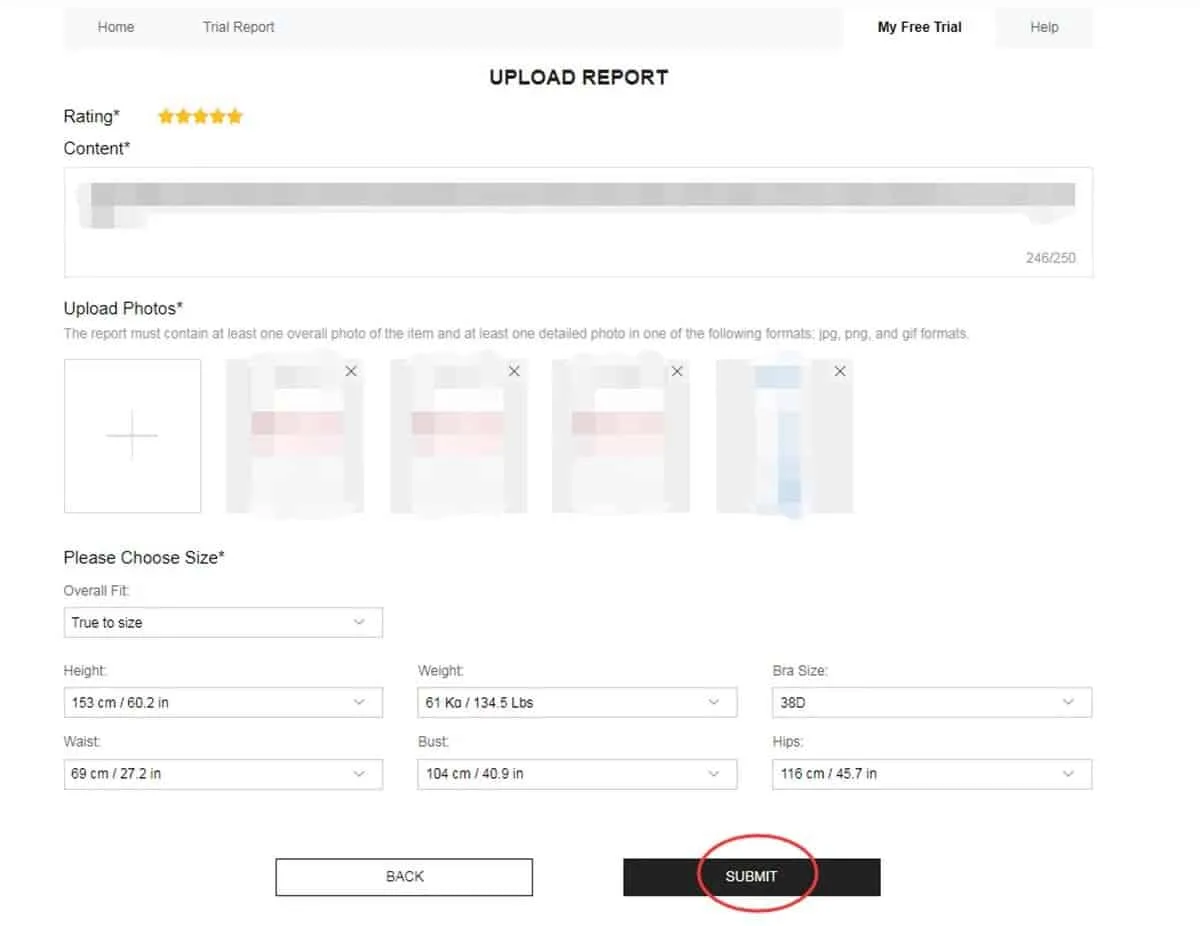
Panel showing your report status and the rewards you've earned
Fix your report if it's marked Failed
If your report's status switches to Failed, you usually get one more chance to edit it. Inside My Report, look for the Rewrite option. Use it to improve your text (quality, style, fit, fabric and finish), swap blurry photos and resend it before the deadline. Don't leave a rejected report as is. It could hurt your future selections.
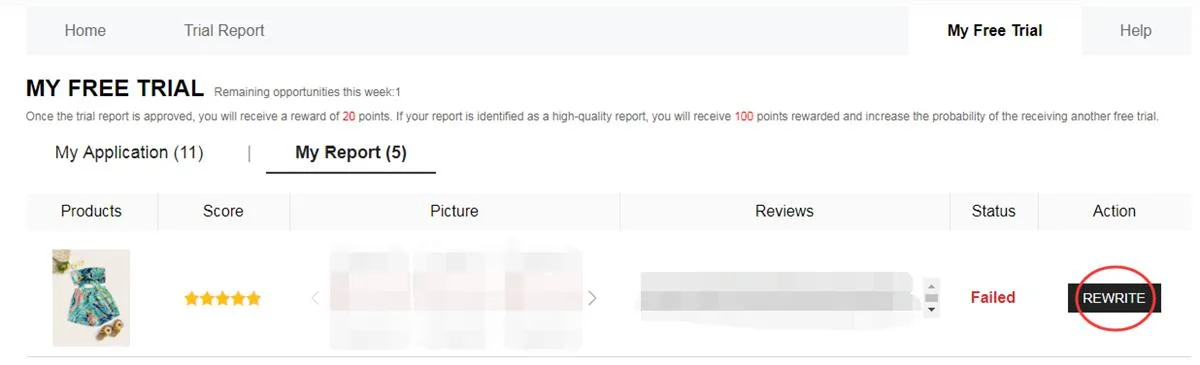
My Report screen showing a Failed status and the Rewrite option for resending
How to Build a Review That Counts:
To pass the moderation filters and meet their rules, a strong review should include:
How Rewards Work: An approved review usually puts 20 points in your account. If it earns a “High-Quality Report” rating, you get 100 extra points to use on your purchases.
Bad Habits That Can Lower Your Odds of Selection
Steer clear of these mistakes to protect your internal profile:
❌ Letting your profile go stale or leaving out your body measurements.
❌ Using a delivery address outside the active store's geographic region.
❌ Applying once the weekly campaigns are underway.
❌ Posting bland, very short texts with no real details or genuine photos.
❌ Going past the 10-day deadline for your required report.
❌ Ignoring the Rewrite option on a Failed report when the system gives it to you.
❌ Staying away from the app for ages and coming back only for the perks.
People who get picked more often tend to share a routine. They keep a full profile, apply the moment weekly windows open, use a verified address and send detailed, on-time reviews with real photos.
— A tip from the Sequovera editors
Key Conditions to Keep in Mind
• You get 3 tries per weekly cycle. Unused spots don't add up.
• Your delivery address must match the region of the active web store's country exactly.
• Standard shipping is paid by the company. Still, customs fees may apply based on the country it ships to.
• Every review must be sent within 10 days of getting the package.
• If a review shows Failed, you usually get one more chance (Rewrite) to fix it.
• Using fake details or running several accounts on one device can lead to a permanent block.
• Sending feedback late, or not at all, hurts your odds in future selections.
Your Questions Answered (FAQ)
Do you pay anything for product shipping?
No. The platform pays for all regular shipping. You just need to watch for possible customs fees or rules in your country.
How many catalog items can you request at once?
You can apply for up to 3 different items in each weekly round. Credits you don't use expire. They don't roll over to the next cycle.
What if your review isn't accepted?
Your status in My Report may say Failed. You'll usually see the Rewrite option, so you can fix your text and photos and send it again. Check the content and photo rules before you resend.
Do you have to send the products back after your review?
No. Under the standard rules, you keep the products once your review is sent and validated. Still, take time to read each campaign's terms closely.
Popular items run out of spots fast. Members with steady results check the dashboard as each campaign starts, lock in their picks quickly and send, or fix, their reviews before the deadline.
Visit the Official Free Trial Center Dashboard
Check out what's open this week, apply in the right order and follow every step of the process.
You'll be sent securely to the platform's official trial area.
Where this comes from and tech help: Shein Free Trial Help Center


